
Actions, decisions and activity
Find out why a request was allowed or stopped and what the application reported afterward.
An Action is the saved account of one Runtime request: the AI system and application involved, the rule checks, any approval and the reported execution. Use it when someone asks why a payment was stopped or whether an allowed request actually completed.
For example, a support team sees an allowed account-change request. The Action can show the allowed check and a separate completion report. That difference matters: permission to make a change is not the same as a report that the application made it.
Explain one request from beginning to end
1. Find the Action
Open Actions & decisions in AuthRail or follow View in AuthRail from the originating application. Check that you have the intended AI system, deployment, target and Runtime mode. In Observe, a would-deny decision may sit alongside a completed operation because the mode is advisory.
2. Read the request decision
Read the outcome and reason. Follow the rules used for that decision and look for missing business facts or required processing. If the request needed human review, open its approval and check the reviewers, expiry and outcome.
3. Inspect execution and the result check
Expand Execution reports. Look for a started attempt and the application's completion, failure or uncertain-outcome report. Read the result check as well: the application may have completed an operation whose result was then withheld from the agent.
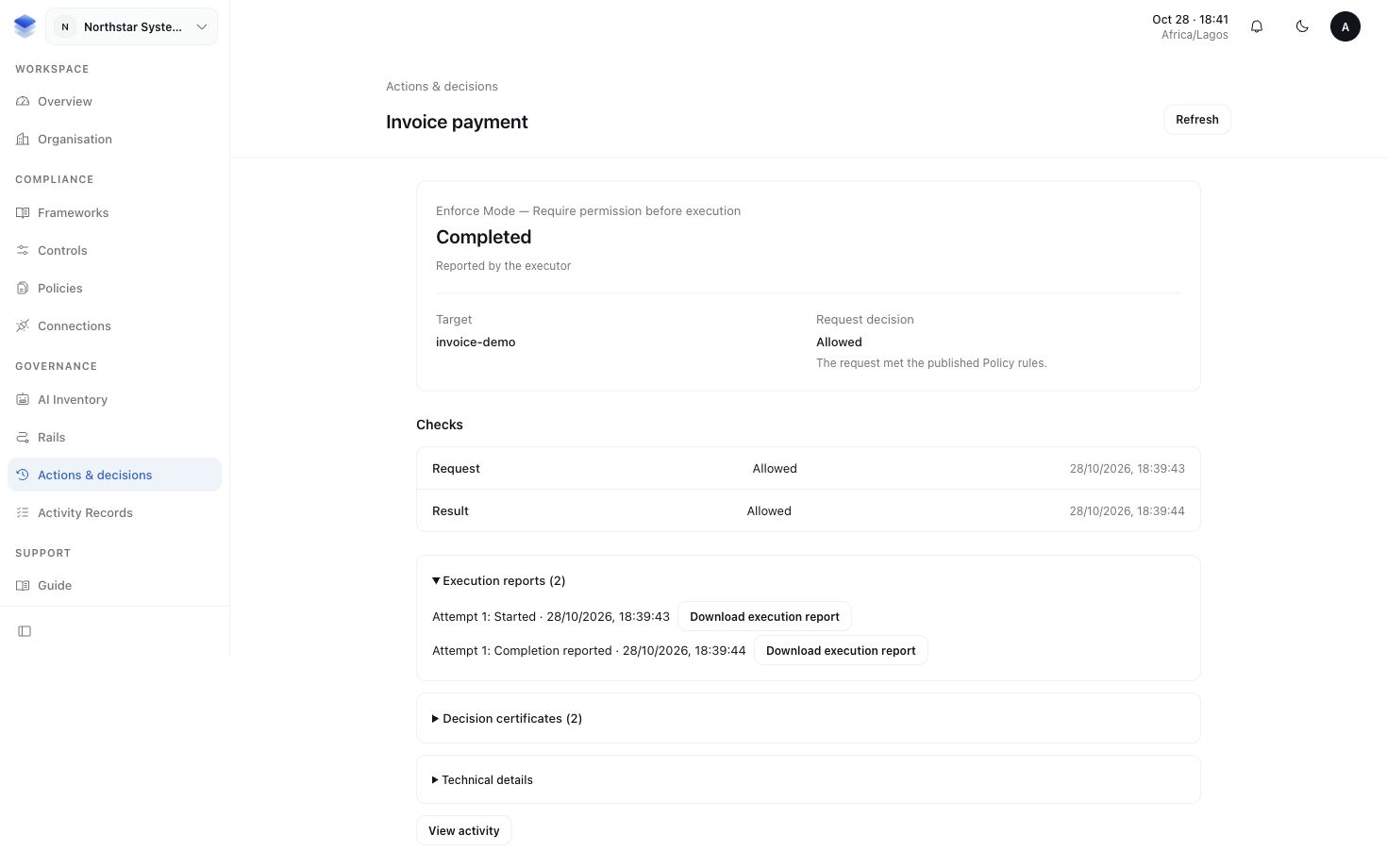
If no completion is known, do not treat the Action as a successful provider change. Investigate the application's saved operation history and, where appropriate, the provider's own record before retrying.
4. Follow the related activity
Use the linked Activity Records to see meaningful events in their business context. An Activity Record describes the event for organisational review; the Action keeps the detailed Runtime checks and execution reports together.
You should now be able to explain what was requested, why the rule allowed or stopped it, who reviewed it and what the application reported. The Runtime walkthrough shows this alongside the sample application and sidecar.
Keep the Action reference with your application task
The SDK returns the decision alongside its check. Save its Action ID with your application task so an operator can find the same request in AuthRail. The helpers below print only decision metadata; do not print the input, result or entire continuation. Identifiers belong in private diagnostic fields, not metric labels.
import type { ObserveDecision } from '@authrail/sdk-node';

function logDecision(decision: ObserveDecision | null | undefined) {
  if (!decision) return;
  console.log(JSON.stringify({
    actionId: decision.actionId,
    certificateId: decision.certificateId,
    outcome: decision.outcome,
    recordingStatus: decision.recordingStatus,
  }));
}
Pass checked.callDecision and checked.resultDecision after Enforce, or
checks.callDecision and checks.resultDecision after awaiting an Observe
run's observation. Handle the separate check errors when a decision is absent.
retained means AuthRail acknowledged the record. queued means delivery is
still pending in the local sidecar; do not display it as already saved in the
workspace. These helpers log metadata, rather than proving provider completion.
The SDK guides show where the
returned decisions fit into a connected function.
More about the different records
| Record | What it explains |
|---|---|
| Decision Certificate | The saved check, its rule versions and reasons, with information to check record integrity. |
| Execution receipt | A signed report from the registered executor about an attempt or its outcome. |
| Approval and permit | Human review and one-use permission for the checked request. |
| Activity Record | A meaningful business event linked to its context and Runtime Action where present. |
| Runtime log | Operational events useful for diagnosing a deployment. |
A certificate does not independently verify provider completion or certify compliance. A signed execution receipt is an application assertion, not an independent provider lookup. Approval does not show that execution started. Runtime logs and internal monitoring traces do not replace durable Actions, approvals, receipts or Evidence review.
For a denied Enforce call, investigate any reported start and the application's or provider's history. A saved denial cannot prove that an alternative route did not perform the operation.
More about agent, provider and model details
An Action can show the inventory name and provider/model configuration saved with it. Later inventory edits do not replace that historical context.
A contextual fact can also identify its source, account, resource, extraction model, settings and timestamps. Those details explain how the fact was obtained; they do not establish that the same model generated the agent's request. Treat execution identity as unreported when it was not reported rather than inferring it from configuration.
Access remains limited by organisation and permissions. An internal support role does not automatically grant access to all tenant payloads.
More about using Runtime history as proof
When reviewing an older decision, use its saved certificates, execution reports and rule versions. A newer Rail cannot replace the one used for that Action. An older record without a saved signed report cannot be treated as if it had one.
For audit use, a Control's Test or Evidence requirement defines the period, coverage, completeness, freshness and review needed. See Framework proof. An integrity attestation does not turn an application-reported effect into independent verification.