
Connect a Python application
Add call and result checks to an async Python function and inspect its decisions.
The Python SDK connects a function in your application to the local AuthRail sidecar. Start in Observe: your function keeps running while the sidecar checks its request and result against your selected Rails.
This guide reads a safe invoice file so you can see the checks without moving
money or calling a provider. You need Python 3.11 or newer and a running sidecar.
Complete your first application and the
connection setup first. Your reviewed action must accept a text
invoiceId and describe the invoice result fields used below.
1. Install the SDK
Create a virtual environment in your application directory and install the PyPI package:
python3 -m venv .venv
source .venv/bin/activate
python -m pip install authrail==0.1.1
Run python --version and confirm it is at least 3.11. If your machine has
several interpreters, create the environment with the intended one, such as
python3.11 -m venv .venv. Installing the SDK does not start the sidecar.
Install from source when contributing
git clone https://github.com/AuthRail/authrail-sdk-python.git
cd authrail-sdk-python
python3 -m venv .venv
source .venv/bin/activate
python -m pip install -e '.[dev]'
The SDK repository explains how to run its checks before submitting changes.
Use the native sidecar if Python runs directly on your host. If Python runs in Docker, follow the shared network setup.
2. Prepare a safe example
In the private directory prepared during connection setup, keep the existing
adapter-token and executor-private.pem files. Add connection.json with
your copied IDs:
{
  "organisation_id": "YOUR_ORGANISATION_ID",
  "deployment_id": "YOUR_DEPLOYMENT_ID",
  "operation_version_id": "YOUR_REVIEWED_OPERATION_VERSION_ID"
}
Replace each placeholder. The Operation Version ID comes from the confirmed action's details, not its display name or parent action ID.
In the same private directory, create invoice.json with safe example data:
{"invoiceId":"invoice_123","status":"open"}The sidecar gets your application's public key. The Python process gets the private key and adapter token. Keep both outside the agent and browser bundle.
3. Observe the function
Save this as observe_invoice.py. Change the private-directory path if you
used a different one during setup:
import asyncio
import json
from pathlib import Path

from authrail import AsyncObserveClient, Operation


async def main():
    private = Path.home() / ".local/share/authrail/my-deployment"
    settings = json.loads((private / "connection.json").read_text())
    async with AsyncObserveClient(
        sidecar_url="http://127.0.0.1:7078",
        organisation_id=settings["organisation_id"],
        deployment_id=settings["deployment_id"],
        adapter_token=(private / "adapter-token").read_text().strip(),
        executor_private_key=(private / "executor-private.pem").read_bytes(),
    ) as client:
        operation = Operation(
            version_id=settings["operation_version_id"],
            action_key="invoice-read-request-001",
            principal_id="staff_123",
            session_id="task_123",
            principal_source="application_session",
            resource_source="application_lookup",
            resource_id="invoice_123",
        )

        async def read_invoice():
            text = await asyncio.to_thread((private / "invoice.json").read_text)
            invoice = json.loads(text)
            if invoice["invoiceId"] != "invoice_123":
                raise ValueError("Invoice does not match this request")
            return invoice

        run = client.observe(operation, {"invoiceId": "invoice_123"}, read_invoice)
        invoice = await run.result
        checks = await run.observation
        print("Invoice status:", invoice["status"])
        print("Call:", checks.call_decision, checks.call_error)
        print("Result:", checks.result_decision, checks.result_error)


asyncio.run(main())
Run it with the activated environment:
python observe_invoice.pyThe invoice result comes from your function. The separate checks show what the Rails would decide. A denied Observe decision does not stop this read. Await both the result and observation before closing the client or ending the process. An async server can reuse a client across requests.
The fixed user and resource IDs are for this local example. In your application, resolve them from authenticated application state and trusted resource lookups. Do not let agent-written arguments choose another user or account. Keep the business action key stable for retries of the same request.
4. Find the request
Open the deployment's Actions & decisions and inspect its call and result
checks. A report marked retained reached AuthRail; queued means it is still
saved locally for delivery. Check deployment monitoring if
the request is missing.
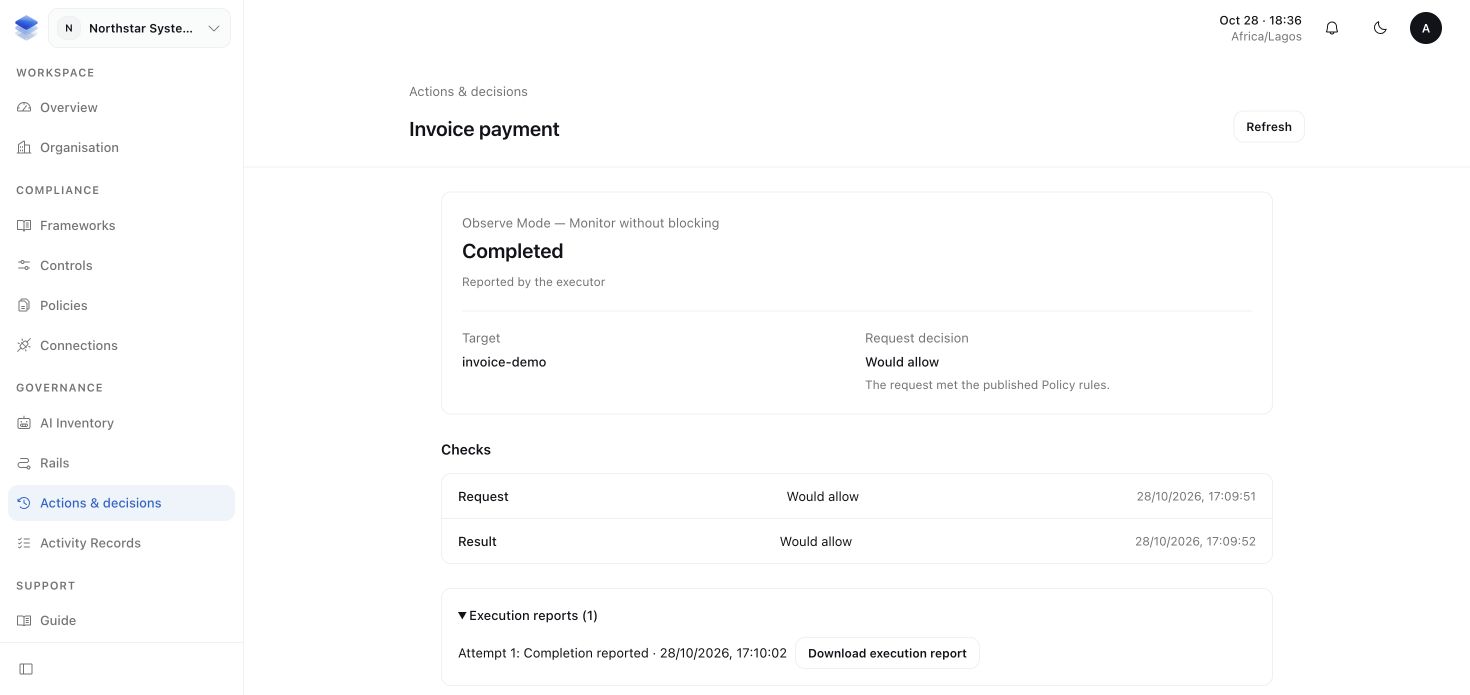
The Runtime walkthrough shows the same journey through a connected application, sidecar logs and workspace records.
Require permission before the function runs
When you are ready for Enforce, first review modes and the
execution boundary. Create AsyncEnforceClient with the same
connection settings. Its callback receives the checked arguments and an
execution context, and enforce returns only after the result check passes.
For a provider write, the callback must save that execution context with the
business request and use its stable provider idempotency key. An
EnforceBlockedError identifies the blocked phase and whether an effect may
already have occurred. An EnforceOutcomeUnknownError requires reconciliation
before retrying.
The Python README shows these APIs, including saved approval continuations, permit recovery, Guard processing, fact readers and contextual AI. Follow human approvals for saving and resuming application work, and execution recovery for uncertain provider outcomes.