
Rails
Create a rule for an application's action and check how it handles representative requests.
A Rail is a rule AuthRail checks for an action your application can perform. For example, a payment rule may allow small payments and require a person's approval above a limit. Another rule may keep a code-review comment internal.
Use Rails when an organisational expectation needs to be checked at the actual application call or result. The application adapter applies the decision at the protected function; publishing a document alone does not add that check.
Add a payment-review rule
For this example, suppose a published Policy requires approval for payments above the organisation's automatic limit. The payment action must already be reviewed in AuthRail. Its saved description, called an Operation, defines the information the application supplies and the result it returns.
1. Open the action's rule setup
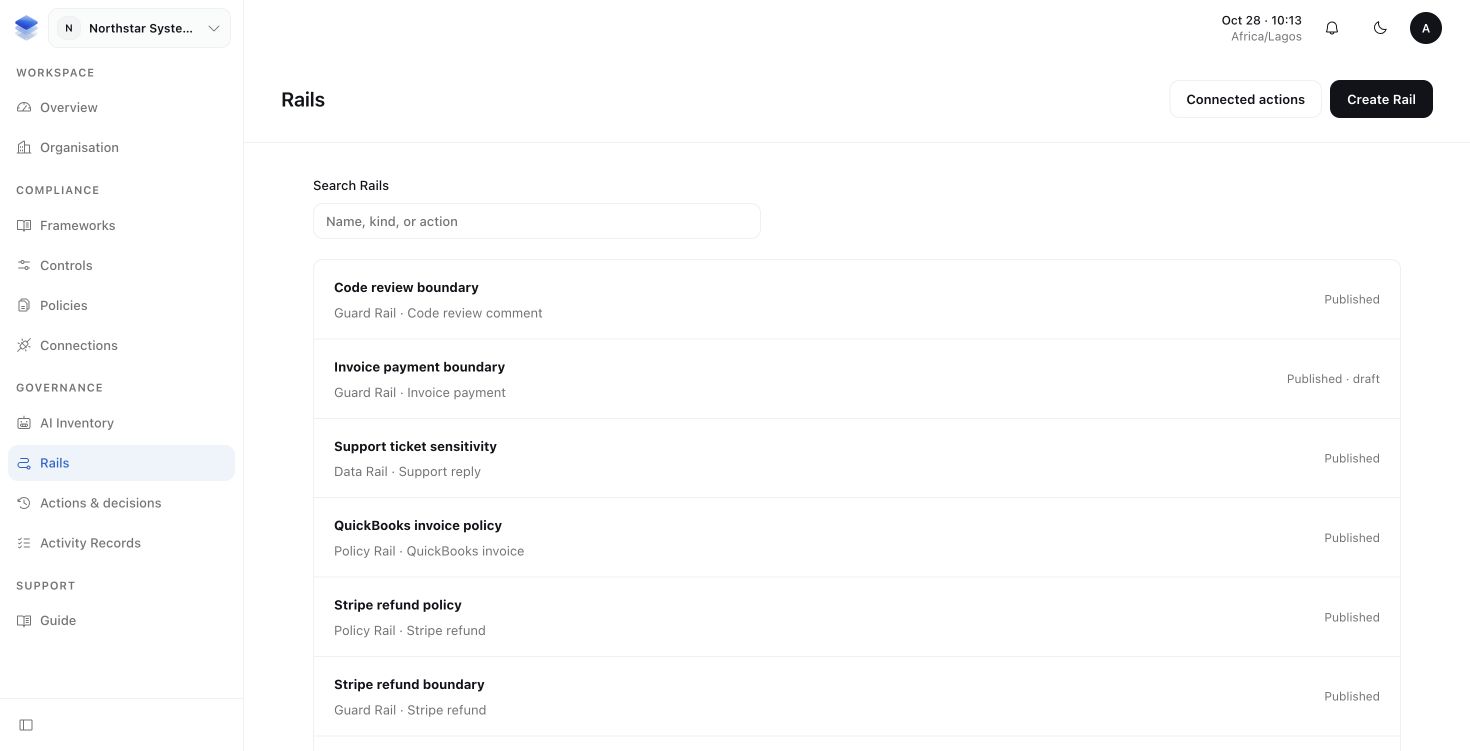
Open Rails and choose Create Rail. Select the kind of Rail and the reviewed payment action. Read its amount, account and target fields before writing the condition.
| Kind | What it supplies |
|---|---|
| Guard Rail | A boundary on input, results or information flow, with supported processing where needed. |
| Data Rail | A reviewed source of business context, such as an invoice balance or a model's answer about a message. |
| Policy Rail | A rule drawn from a published organisational Policy. |
Choose a Policy Rail for this payment expectation and select the published Policy version that supplies it.
2. Describe the condition and outcome
Set the payment condition and the required outcome. For example, an amount above the reviewed limit requires human approval. Keep the allowed account and invoice boundaries clear so approval of an amount does not grant access to another record.
If the decision needs information not supplied by the requested arguments, choose the reviewed fact source. Facts and contextual AI explains how the application supplies that information.
3. Try examples before publication
Add a normal allowed request, a request outside the boundary and a request that needs approval. Include a missing-context case if the rule uses facts. Run Rail validation and read the outcome and reasons for each example.
Validation checks the rule against the examples. It does not pay an invoice or send a message. Revise the draft if it does not express the intended expectation.
4. Publish and select the rule
Publish the reviewed Rail, then select that version for the application's deployment. A deployment is the configured installation of an application with its own identity and selected rules.
The expected result is a tested, published rule selected for the intended application. Confirm its behaviour through real safe application requests in Observe before relying on Enforce protection.
Example: register processing for one text field
A Guard can require a trusted function to process a string before the call or
result check. For example, a demo application may remove the literal marker
DEMO_SECRET from a draft comment. This example removes only that marker;
it is not a general detector or remover of sensitive information.
In the Guard editor, open Developer configuration · required processing
and select Reviewed string field, such as arguments.message. Use Registered handler ID remove_demo_marker, Processing
sanitize, and its version to the reviewed implementation's 64-character
lowercase SHA-256 fingerprint. The developer registers the same ID, kind and
fingerprint in the protected application. If the code changes, review its new
fingerprint and update the Guard before using it.
Here config is the private sidecar connection configuration from your SDK
guide, including its signing key. reviewedHandlerSha256 is the fingerprint
you reviewed for this code, not a hash of a user's message. operation is the
reviewed comment action with application-authenticated identity and a stable
business key. saveComment is your existing protected application function;
it must use the checked arguments the SDK gives it and the execution's
provider idempotency key when recording its effect.
import { EnforceClient, type GuardHandler } from '@authrail/sdk-node';

const removeDemoMarker: GuardHandler = {
  id: 'remove_demo_marker', version: reviewedHandlerSha256, kind: 'sanitize',
  process(value) {
    if (Buffer.byteLength(value, 'utf8') > 4096) {
      throw new Error('Comment is too large for this handler');
    }
    return value.replaceAll('DEMO_SECRET', '[removed]');
  },
};
const client = new EnforceClient({ ...config, guardHandlers: [removeDemoMarker] });
const checked = await client.enforce(
  operation, { message: 'Please remove DEMO_SECRET from this demo.' },
  (checkedArguments, execution) => {
    if (typeof checkedArguments.message !== 'string') {
      throw new Error('Expected a checked comment string');
    }
    return saveComment(checkedArguments.message, {
      idempotencyKey: execution.providerIdempotencyKey,
    });
  },
);
When the published Guard requires this handler for arguments.message, the SDK
processes that string before its final call check. If the call is permitted,
saveComment receives the processed value, such as
Please remove [removed] from this demo. A rule targeting result.message
instead processes that returned field before checking what may reach the agent.
Do not call the processor manually and assume that fulfills a Guard: the
adapter obtains the reviewed processing plan and records its signed evidence.
The handler only changes its selected string; it must not post a comment or perform another business effect. The SDK checks required processing and the resulting values. A missing or failed handler stops Enforce. Observe does not run these handlers, and processing does not override a denial or missing approval.
More about versions and later changes
A draft can change; a published Rail Version cannot be edited. Older Actions keep the rule version used for their decision even after you publish an improvement.
A new publication does not silently replace a deployment's selection. Review and update that selection deliberately. If a decision is unexpected, inspect the selected version and the version saved on the Action before editing a draft.
Examples and historical replay are Rail-validation tools, separate from the two Runtime deployment modes, Observe and Enforce.
More about processing and trusted facts
Some Guard rules require sanitize for content cleanup, transform for a value
change or isolate for a supported containment step. The application registers
the trusted code for that step, called a handler. The rule identifies its
version and the field it must process; the adapter invokes only a matching
handler and signs evidence of the processed value before the final decision.
Missing handlers, conflicting targets and unsupported isolation stop Enforce. Processing does not override a denial or approval requirement. Observe remains advisory and does not transform the real input or result.
Handlers must not perform business effects such as posting a comment or moving money. A signed handler report does not independently establish the quality of redaction or isolation. See NVIDIA OpenShell for its supported containment path.
The protected application performs reviewed fact lookups; the sidecar checks the signed answers. An imported schema does not create a provider connection or make a source trustworthy. A failed lookup is not a zero balance or a negative sensitivity answer. Configure and test the rule's unavailable behaviour.