
Facts and contextual AI
Give a rule the business information it needs, including an answer read from selected text.
AuthRail's contextual AI helps a rule use information that needs to be read from text. Your application uses AuthRail's SDK to ask a configured model a reviewed question, check the answer and supply it to the rule.
An amount or account ID may be enough to check a simple payment limit. Other rules need to understand a document, a reason for a payment, the content of a proposed export or the description of a production change. A model can read that selected material and return a specific answer. That answer is a fact: information the rule uses when deciding whether the action may continue.
Some facts do not need a model. An application can read an invoice balance from a trusted system. Use contextual AI when the answer requires interpreting selected material, and a normal lookup when the source already stores the value.
| Before this action | A contextual question could ask | Your rule could require |
|---|---|---|
| Export a document | Does it contain confidential business information? | Review before export when the answer is yes. |
| Pay an invoice | Which approved purpose best describes the payment justification? | Review when no permitted purpose matches. |
| Run a production change | Does the change plan describe deleting stored data? | Approval before a destructive change. |
These are questions you can define, rather than preconfigured checks. Contextual AI returns a Yes/No answer, category or score. Your published rule uses that answer; model confidence alone does not establish permission.
Who configures and runs the model check?
AuthRail's server stores the reviewed source configuration and the Rails that use it. Your application runs the model check through the SDK before supplying the fact to the sidecar for evaluation. The sidecar evaluates the resulting fact against those Rails; it does not choose a model or initiate the model call.
The supplied Node, Go and Python model clients use OpenAI's Decisions API with GPT-6 Luna. Your application supplies its own OpenAI API key and uses its own provider account. This check does not automatically reuse your agent's model or its credentials. Another provider needs an extractor implementation and validation; changing the model name alone does not connect it.
The server records the model identifier, settings fingerprint and reading instructions version, along with source identity, answer type and freshness limits. The application supplies the actual question and matching model settings to the SDK. The fingerprint binds that setup to the reviewed source. Creating a source in the workspace alone does not install or run the extractor in your application.
In the tenant workspace, open Rails → Create Rail → Data Rail → Continue. Under Connect a source, choose AI context. The source form includes Required AI reading configuration for the model and settings information. Configure this in your organisation's workspace.
Add a credentials-request check to a support reply
This setup involves the person reviewing the rule and the developer connecting the application. The reviewer decides what question is appropriate; the developer controls the source text and the model call.
1. Choose the question and the text it needs
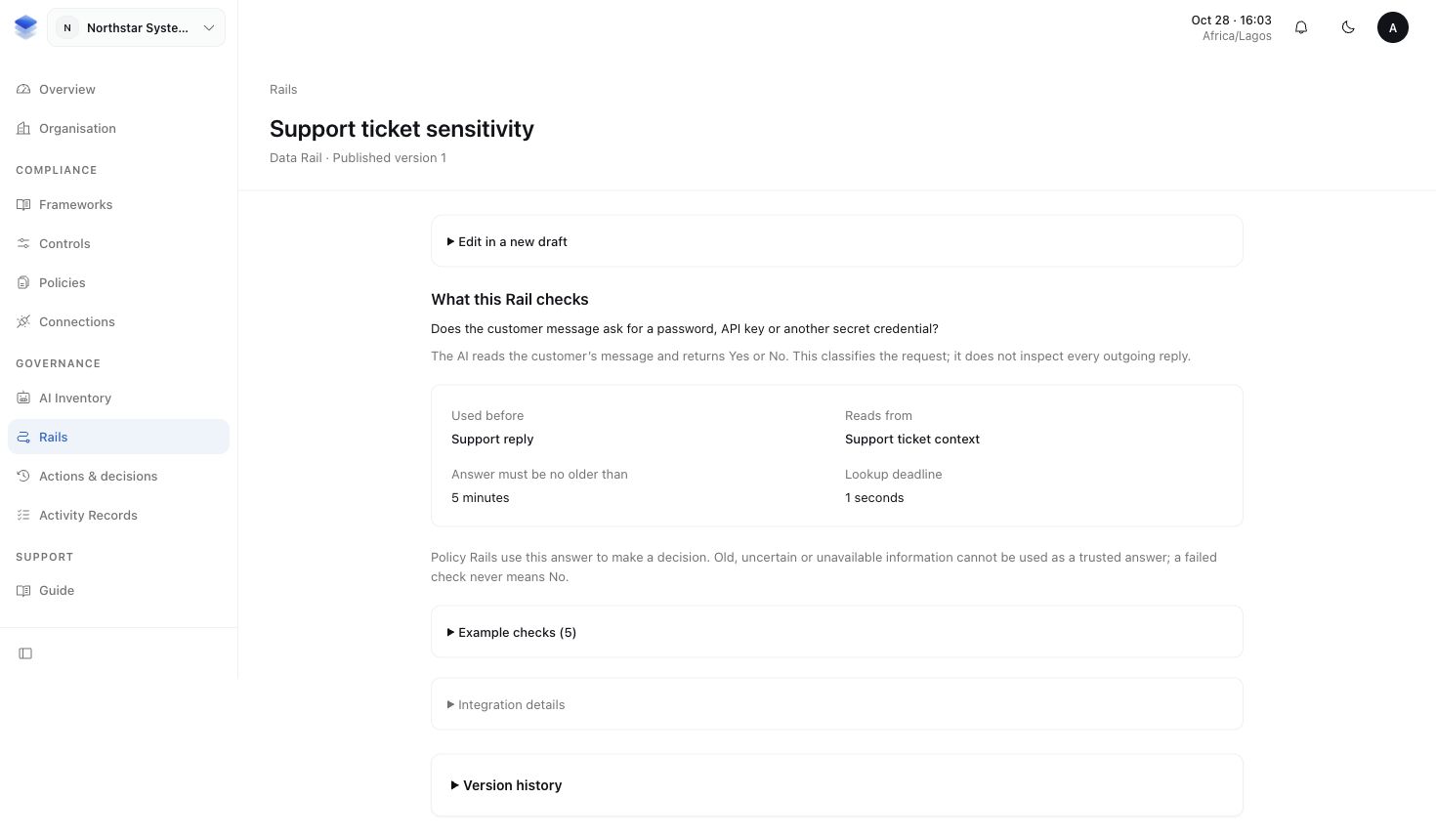
Use a question with an answer the rule can check, such as a Yes/No answer to whether the customer message requests credentials. Select the customer message needed for that question, rather than sending an entire ticket and every attachment.
The selected text goes to the configured model provider. Decide which fields may leave the application and which provider and account may receive them. Remove unnecessary fields and redact protected values in trusted application code before the model call where your disclosure policy requires it. The extractor does not automatically remove every protected value. If the material cannot be shared safely, do not send it.
2. Review the source setup with the rule
Agree on the question, expected answer, model, confidence requirement and what
should happen if the answer cannot be obtained. The application supplies the
question and confidence setting to the SDK. Use
openAIDecisionsConfigSha256 in Node, OpenAIDecisionsConfigSHA256 in Go, or
openai_decisions_config_sha256 in Python,
to calculate the settings fingerprint for that exact question.
In the source form, record that fingerprint, model identifier and instructions version along with the source and freshness settings. Save and review it as a Context Source Version, then select that version for the Data Rail. This binds the application's model setup to the source that was reviewed; it does not supply the application with the question text. Keep the question in the application's reviewed configuration.
Open the published Data Rail's Integration details to copy its Reviewed source version ID and source configuration. In the editor, use Source details for developers. The SDK needs this exact ID; the displayed version number alone is not enough.
3. Connect the application's fact reader
The developer uses a matching SDK extractor—the helper that sends the selected text and question to the model. The application checks the answer's format and confidence, signs the answer with its source information, and supplies it to the local sidecar. AuthRail receives the reported fact status and bounded provenance, not the source text or extracted value.
Your application owns the model credential and the choice of source fields. The agent must not choose another provider URL, switch accounts or supply its own credential for this check.
Example: supply a model answer before the check
Copy Reviewed source configuration from the Data Rail's Integration
details into your application's reviewed configuration. It has this outer
shape; contract contains the fields shown in the workspace:
{
  "sourceVersionId": "YOUR_REVIEWED_SOURCE_VERSION_ID",
  "contract": {
    "formatVersion": 5,
    "kind": "extraction",
    "sourceIdentity": "support-message",
    "accountBoundary": "YOUR_REVIEWED_ACCOUNT",
    "lookup": "ticket.read",
    "queryField": { "root": "arguments", "path": ["ticketId"] },
    "factKey": "requestsCredentials",
    "resultPath": ["requestsCredentials"],
    "valueType": "boolean",
    "modelId": "gpt-6-luna",
    "modelConfigSha256": "YOUR_REVIEWED_SETTINGS_FINGERPRINT",
    "promptVersion": "support-review-v1",
    "maxInputBytes": 4096,
    "maxOutputBytes": 256,
    "maxAgeSeconds": 60,
    "timeoutMs": 2000,
    "failure": "unavailable"
  }
}
This is the shape to recognise, not a source to publish unchanged. Copy your actual source ID and settings. The question below is application configuration: calculate its fingerprint before reviewing the source, then require that same fingerprint at runtime. Never replace the saved fingerprint with a new one merely to make a changed question pass.
In these examples, reviewed is the copied configuration loaded by your
application, and message is a record obtained after authenticating the user
and checking access to the ticket. It supplies the ticket ID, selected text,
source observation time and an opaque source location such as
ticket:ticket_123. openAIKey (openai_key in Python) is your application's own provider credential. The client, operation, action arguments and
protected send function come from
your SDK setup; they are application objects, not values
the agent can choose. Add the fact before calling Enforce:
import {
  extractContextFact, newOpenAIDecisionsExtractor,
  openAIDecisionsConfigSha256, type ExtractionSource,
} from '@authrail/sdk-node';

const question = {
  type: 'predicate',
  instructions: 'Does this customer message request a password or API key?',
  minConfidence: 0.8,
} as const;
const c = reviewed.contract;
const source: ExtractionSource = {
  sourceVersionId: reviewed.sourceVersionId,
  sourceIdentity: c.sourceIdentity, accountBoundary: c.accountBoundary,
  lookup: c.lookup, timeoutMs: c.timeoutMs,
  resultPath: c.resultPath, valueType: c.valueType,
  modelId: c.modelId, modelConfigSha256: c.modelConfigSha256,
  promptVersion: c.promptVersion,
  maxInputBytes: c.maxInputBytes, maxOutputBytes: c.maxOutputBytes,
};
if (openAIDecisionsConfigSha256(question) !== source.modelConfigSha256) {
  throw new Error('Review the changed model question before using it');
}
const extractor = newOpenAIDecisionsExtractor({ source, question, apiKey: openAIKey });
const fact = await extractContextFact(
  source, message.id, message.sourceLocation, message.observedAt,
  new TextEncoder().encode(message.selectedText), extractor,
);
const checkedOperation = { ...operation, factResolutions: [fact] };
const checked = await client.enforce(checkedOperation, actionArguments, protectedSend);
The selected text is sent to OpenAI by the extractor. The sidecar's deterministic
rule engine uses the returned fact; the model does not return the final allow
or deny decision. Do not convert an uncertain or unavailable fact to false.
Pass its status through so the published rule can handle it.
4. Compare ordinary and sensitive requests
Connect the fact to the rule that requires review, then try an ordinary customer message and one asking for credentials. Also test an unavailable or uncertain answer. Inspect the Action's decision and source status.
The expected result is a typed answer the rule can use, with enough source information to explain where it came from. A positive credentials answer can require review before the protected send function runs. The model's answer supplies context; it does not itself give permission to send a reply.
See Rails for rule authoring and Actions and decisions for reviewing the result.
Example: read a trusted customer record without a model
A customer-record lookup can supply a stored value such as whether a customer has completed a review. Configure a separate reviewed customer/database source for that fact. Copy its ID, source name, account, lookup name and timeout from Reviewed source configuration; do not reuse the extraction source above.
Here reviewedCustomerSource is the separate customer source JSON copied
from the workspace (reviewed_customer_source in Python). The examples map its
reviewed fields to the SDK's CustomerSource configuration. customerId comes from the application's access-checked
customer record. customerStore.read is your own read-only database helper,
not an AuthRail API. It accepts that ID and the reviewed account, honours the
SDK's cancellation/deadline, and returns the stored account, ID, value and source
observation time. Its database credential stays in your application.
import { lookupCustomerFact, type CustomerSource } from '@authrail/sdk-node';

const c = reviewedCustomerSource.contract;
const customerSource: CustomerSource = {
  sourceVersionId: reviewedCustomerSource.sourceVersionId,
  sourceIdentity: c.sourceIdentity, accountBoundary: c.accountBoundary,
  lookup: c.lookup, timeoutMs: c.timeoutMs,
};
const fact = await lookupCustomerFact(customerSource, customerId, async (key, signal) => {
  const row = await customerStore.read(key, customerSource.accountBoundary, { signal });
  return {
    sourceIdentity: customerSource.sourceIdentity,
    accountBoundary: row.accountId,
    lookup: customerSource.lookup, lookupKey: row.id,
    observedAt: row.observedAt, value: { reviewComplete: row.reviewComplete },
  };
});
const checkedOperation = { ...operation, factResolutions: [fact] };
Use the operation carrying the returned fact in your next SDK check, as in the contextual example. The actual row account and record ID are returned so the SDK can reject a mismatch; do not overwrite a mismatched row's identity to make it appear trusted. Keep the source observation time rather than making old cached data look freshly observed. A successful read supplies information, not permission for the business action.
More about ordinary lookups and model answers
| Question | Source | Example answer |
|---|---|---|
| What is the invoice's remaining balance? | Reviewed QuickBooks invoice lookup | A number such as 80. Currency needs its own reviewed source. |
| What is the invoice's status? | Reviewed Stripe invoice lookup | The status from the selected invoice and account. |
| Does the customer message ask for credentials? | A configured model reading that message | true or false, with the required confidence. |
Other model questions can return a category or a score. The returned value must match the shape expected by the rule; a free-form explanation cannot replace its required Yes/No answer.
A fact reader performs a read. It must not execute the payment or message being checked. Provider credentials, OAuth consent, refresh and revocation belong to the application. A compliance Connection does not grant Runtime permission to change provider records.
More about source trust and missing answers
A Context Source Version also records the provider account and resource, the expected value type, how long the answer remains fresh and how failures are handled. If the source or model setup changes, review and publish a new version. Use that version's account and resource lookup in application code.
A timeout or unavailable provider means the fact is unavailable. A wrong account, wrong resource or invalid value is untrusted. Neither is a passing answer. Do not replace an unread balance with zero or an uncertain sensitivity answer with false. Follow the configured denial or review behaviour while repairing the source.
A refusal or insufficient model confidence leaves an uncertain answer. A later check of the answer cannot undo source text already disclosed to the provider. Keeping text out of AuthRail's fact report does not keep it out of that model.
More about model identity and earlier actions
The fact's source details identify the model used to read the text. That model can differ from the model configured in AI Inventory and from the model that produced the agent's request. Configuration alone does not prove which model ran the agent.
Rules that depend on earlier actions need history from the application's trusted saved session state. An agent's claim that someone approved an action previously cannot replace an authenticated approval record. Keep raw provider bodies, credentials and source text out of diagnostic logs.