
Configuration
Find each connection value and give it to the process that needs it.
You do not need to invent the values used by the sidecar and SDK. AuthRail supplies the deployment settings. Your application operator creates the local keys and token. This page helps you identify them while following the Docker, native or SDK setup.
For a first installation, use Identity and deployment first. It shows the dashboard controls and creates the private files referenced here.
Copy these values from AuthRail
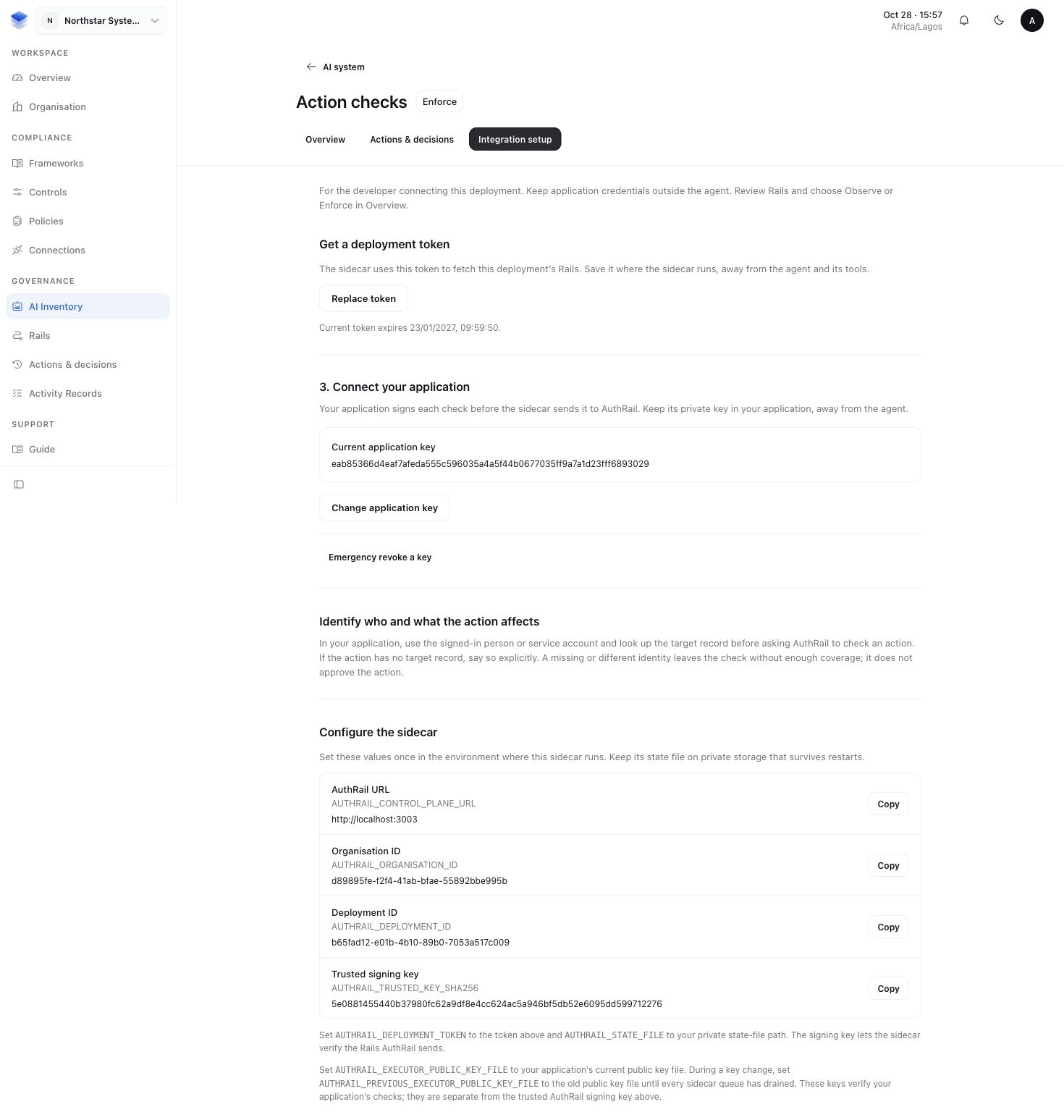
Open your AI system's deployment, then Integration setup → Configure the sidecar. Copy the API address, organisation ID, deployment ID and trusted signing-key fingerprint. Under Get a deployment token, select Create token and save its one-time value privately.
| Sidecar setting | Value to use |
|---|---|
AUTHRAIL_CONTROL_PLANE_URL | The AuthRail URL shown in setup. It is the API address, not the workspace website. Use HTTPS; plain HTTP is accepted only for local-loopback development. |
AUTHRAIL_ORGANISATION_ID | Organisation ID from setup. |
AUTHRAIL_DEPLOYMENT_ID | Deployment ID from setup. |
AUTHRAIL_TRUSTED_KEY_SHA256 | Trusted signing key from setup. Keep both displayed fingerprints during a key change. Do not get this trust value from an unverified bundle. |
AUTHRAIL_DEPLOYMENT_TOKEN | The new token created under Get a deployment token. The sidecar uses it to connect to this deployment. |
Prepare these values locally
The connection guide creates the local files. Their values are not issued by AuthRail:
| Sidecar setting | Value to use |
|---|---|
AUTHRAIL_ADAPTER_TOKEN | The random adapter-token value shared only by the protected application and sidecar. Use at least 32 characters and keep it separate from the deployment token. |
AUTHRAIL_EXECUTOR_PUBLIC_KEY_FILE | The path to executor-public.pem, whose public key you registered in AuthRail. The application keeps the matching private key. |
AUTHRAIL_STATE_FILE | A private state-file path for this instance. Docker uses /var/lib/authrail/state.json and a volume for the whole parent directory. |
The SDK needs the same organisation and deployment IDs, the adapter token,
executor-private.pem, the reviewed Operation Version ID and the local
sidecar URL. Give provider credentials only to the protected application.
Keep all secrets out of agent prompts, browser code and source control.
Leave optional settings alone for the first connection
The standard local address is 127.0.0.1:7078, and the sidecar checks for updated
configuration every five seconds. You do not need a separate monitoring system
to receive local process logs.
Use the options below only when your operator needs them. The monitoring guide explains what the local health fields and optional diagnostics mean.
Listener, sync, key rotation and operator settings
| Setting | When to use it |
|---|---|
AUTHRAIL_HEALTH_ADDR | Change the default 127.0.0.1:7078 only to another reviewed loopback address/port. Never use 0.0.0.0 or expose the listener publicly. |
AUTHRAIL_SYNC_INTERVAL | Set another update interval of at least one second when the operator needs it. Default: five seconds. |
AUTHRAIL_PREVIOUS_EXECUTOR_PUBLIC_KEY_FILE | Point to the previous public PEM during an approved key-change overlap while old reports drain. |
AUTHRAIL_OPERATOR_TOKEN | A separate random secret of at least 32 characters for authorised local recording-gap review. It must differ from adapter and deployment credentials. |
Send optional diagnostics to your monitoring system
AUTHRAIL_OTLP_ENDPOINT is the receiving address of your own OpenTelemetry
Collector. Ask the team operating that monitoring system for its OTLP/HTTP
address; it does not come from AuthRail's Integration setup. Use HTTPS for a
remote Collector.
The sidecar sends traces and metrics to that Collector. Local process logs still work without it. Leave the setting unset if you do not use a Collector.
Docker file settings and image selection
Docker's launcher can read private token files instead of direct token values:
AUTHRAIL_DEPLOYMENT_TOKEN_FILE, AUTHRAIL_ADAPTER_TOKEN_FILE and optional
AUTHRAIL_OPERATOR_TOKEN_FILE. Set the direct value or its _FILE setting,
not both for the same credential.
The Compose recipe takes host file paths through
AUTHRAIL_DEPLOYMENT_TOKEN_PATH, AUTHRAIL_ADAPTER_TOKEN_PATH and
AUTHRAIL_EXECUTOR_PUBLIC_KEY_PATH. They point to files you prepared; they are
not tokens themselves. Compose mounts these files read-only for the sidecar.
The Docker guide supplies the actual launch commands.
AUTHRAIL_SIDECAR_IMAGE selects the sidecar image; it defaults to the local
authrail-sidecar:development build used by that guide. For a reviewed rollout,
the operator selects an immutable image digest. Keep the entire state volume
when changing images and review compatibility first.