
Readiness and remediation
Find the work blocking a Framework duty and follow it to the practice or proof that needs attention.
Readiness shows which applicable Framework duties have the approved practices and supporting proof they need. Use it to find the next piece of work, not to assign your organisation a score.
For example, the support team's human-review practice may be approved, but its monthly Test found requests without approval records. Readiness helps you follow that gap back to the failed check and the work needed to resolve it. The assessment is derived from those records; you cannot edit the percentage.
Find and resolve one blocked obligation
1. Open the Framework's assessment
Open the active Framework's Overview or Readiness. Read the overall state, assessment time and obligation counts. Choose View obligation readiness to see the duties behind the total.
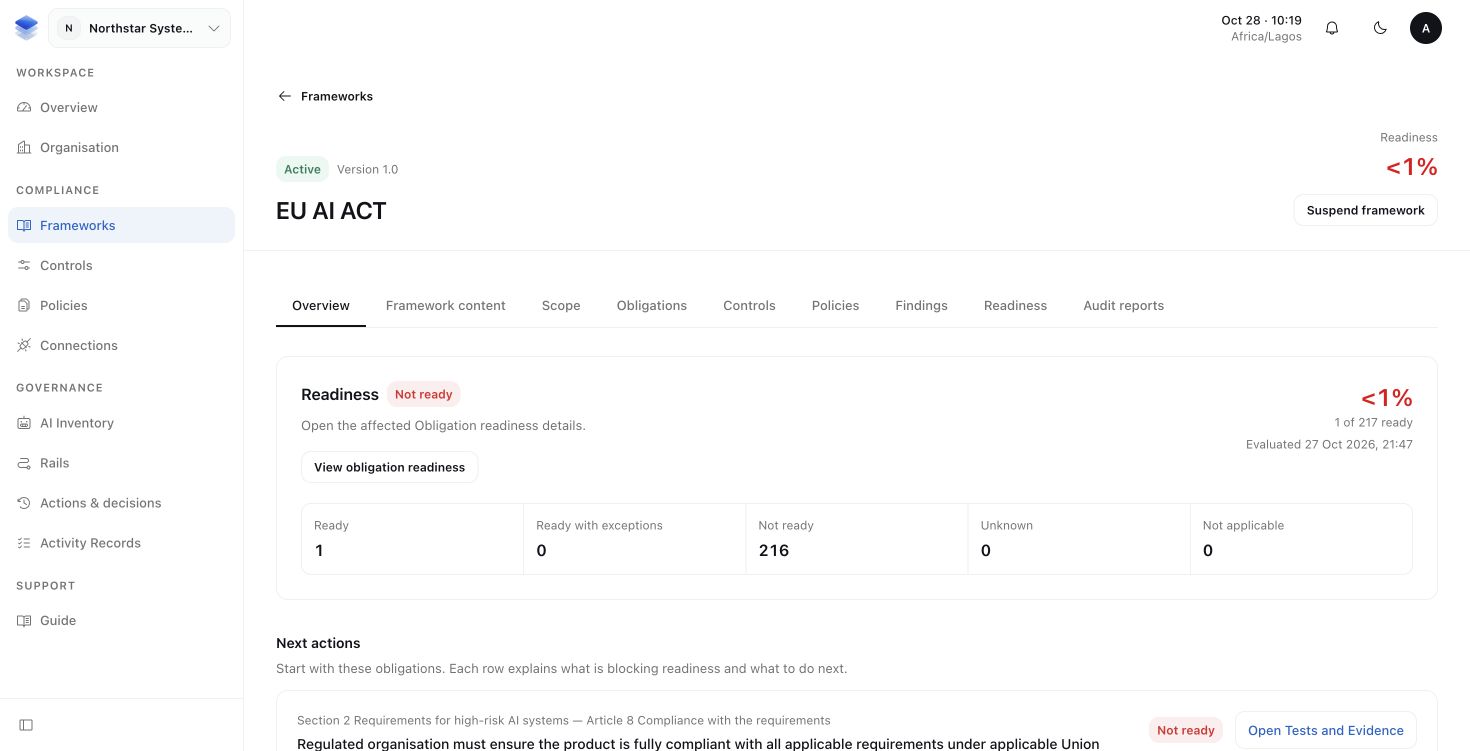
2. Choose a duty that needs attention
Open an obligation marked Not ready or Unknown and read its blockers. Follow the connected Control and its Tests and Evidence. A missing approval, failed check or expired piece of proof needs a different response from an unanswered scope question.
AuthRail calls the assessment of that mapped practice Health. For this review, use the Health and proof connected to the obligation you opened, rather than assuming a Control's overall summary answers every duty it supports.
3. Address the cause
If a Test found missing approval records, investigate the affected requests. Fix the review or record-retention process, then perform the appropriate check and submit the supporting proof. Keep the earlier failure in history.
A Finding records a problem that needs attention. A Task organises work to address it. Use the Framework's Findings view to follow the problem and its work. Finishing a Task alone does not rewrite a failed Test or close its Finding; the source problem has its own review and closure process.
4. Check the updated assessment
Return to Readiness after the reviewed records have been updated. Check its assessment time and remaining blockers. If scope changes are still being applied, wait for that work to finish before relying on the result.
You should be able to explain why the duty is ready or what still blocks it, using the records behind the answer. Readiness is an operational assessment, not legal certification. Continue to Runtime when you are ready to connect these expectations to an application's actions.
More about readiness states and percentages
| State | Meaning |
|---|---|
| Ready | Required coverage and usable supporting proof are in place. |
| Ready with exceptions | An approved, effective Exception covers an eligible known blocker within its limits. |
| Not ready | A known blocker needs work, such as incomplete coverage, a failed check or missing proof. |
| Unknown | The information does not support a dependable conclusion. |
| Not applicable | A reviewed applicability decision excludes this duty for the assessed scope. |
The percentage counts Ready and Ready with exceptions against the assessed applicable obligations. Not-applicable obligations are outside that total; unknowns do not silently become successes. A positive result below one percent is shown as less than one percent.
A passing Test and accepted Evidence support the practice and period assessed. They do not automatically address another obligation or a different practice version. The overall Control summary cannot replace the assessment for the reviewed obligation-to-Control Mapping.
More about Exceptions
An Exception records a decision to accept a specific eligible gap for a limited time. It names the blocker, explains the reason and boundary, sets an expiry, and records steps to reduce risk while the gap exists.
Where Readiness offers Request exception, select the blocker and provide that context. Submit for approval sends it to an authorised reviewer. A requester does not independently approve their own request.
An Exception does not make a failed source fact healthy. It cannot resolve unknown applicability, incomplete coverage or mismatched versions and boundaries. After it expires, the earlier approval is no longer a basis for relying on a with-exceptions assessment.
More about saving an assessment for review
Use Audit reports in the Framework workspace to capture its scope, coverage, proof and assessment at a point in time. The report keeps that saved view while live readiness continues to change.
Archive preparation and download have their own status and access checks. If preparation fails or a link expires, use the available recovery action. Access to a report also depends on access to the records it contains.