
Frameworks and scope
Choose the duties your organisation will work on and review where they apply.
A Framework brings together duties your organisation wants or needs to meet. For example, a Framework may include a duty to provide human oversight of an AI support assistant. Each duty in AuthRail is a Framework Obligation: a statement of who must do what, under which conditions, with its source.
Use a Framework to build a work list grounded in those duties. Your team still reviews which ones apply and how its own practices address them.
Build your first obligation work list
1. Choose a Framework
Open Frameworks in your AuthRail workspace. Use Managed catalogue for Frameworks managed by AuthRail, Organisation frameworks for those your team authors, or Active to return to one already in use.
Open the Framework and read its content. Check the edition, called its Framework Version, before choosing Activate framework. AuthRail opens its workspace with sections for Scope, Obligations, Controls and Readiness. Activation starts the work; it does not mean the organisation meets the duties.
2. Explain your organisation's circumstances
Open Scope. Scope tells AuthRail which circumstances to use when reviewing this Framework—for example, what kind of AI work the organisation performs. Start with the whole organisation. Use a narrower boundary only when the answers or operating practice genuinely differ.
Answer the questions and review the resulting decisions. Save a draft while you are collecting answers. Choose Apply scope when the review is ready, then wait for AuthRail to finish applying the assessment.
If you do not know an answer, keep it unknown and investigate. An unanswered question is not a reason to exclude a duty.
3. Review the duties that apply
Open Obligations and read a duty with its supporting source. Applicability tells you whether it applies to the circumstances you reviewed. Coverage tells you which approved practices address it.
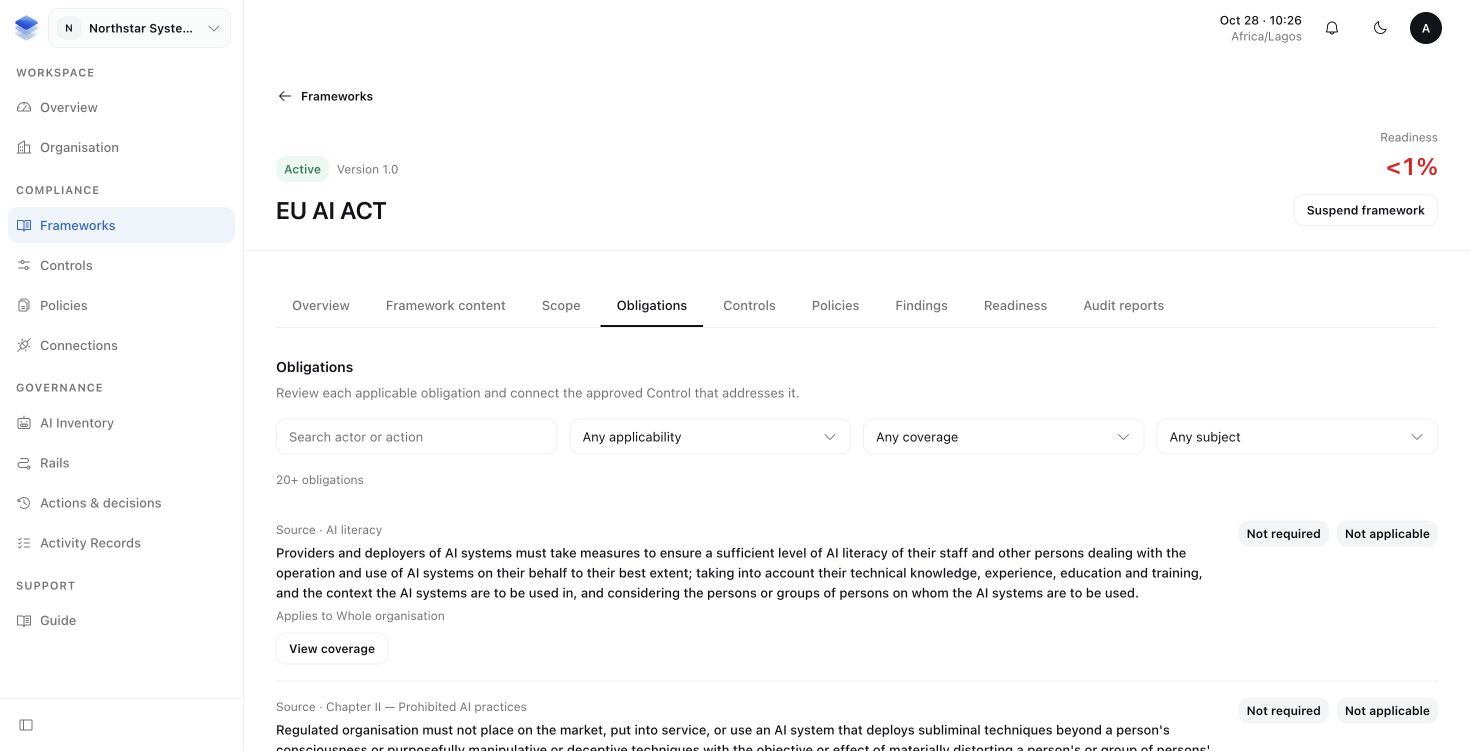
Search or filter the list, then choose View coverage for a duty you need to address. For the support assistant's human-oversight duty, you would look for the approved practice describing how sensitive requests receive review.
4. Choose one duty to work on
If an applicable duty has no accepted Control connected to it, keep that gap visible. A Control is the practice your organisation relies on to fulfil a duty. The next guide shows how to describe and approve it.
You should now have a reviewed work list: duties that apply, duties with a reviewed reason for exclusion and questions that still need answers. Continue with Policies and Controls for the duty you chose.
More about versions and scope history
A published Framework Version cannot be edited. Your scope and coverage work stays associated with that edition when another edition becomes available; review a newer one before adopting it.
Applied scope answers and decisions form a Scope Snapshot, the saved basis for an assessment. Later changes create new reviewed work rather than erasing that basis. Unsaved draft answers do not contribute to the applied assessment.
If someone changes scope while you are editing, reload before applying your review. If applying scope fails, resolve the reported error before relying on the resulting readiness view.
More about pausing or reopening work
Suspend framework pauses active work and retains its identity and history. It is not deletion and does not resolve an existing gap. If you cannot open a workspace, check the organisation and your access before starting another activation.
A not-applicable decision needs a reviewed reason. It cannot stand in for missing information or an unfinished scope question.