
Observe and Enforce
Compare advisory rule checks with protection that can stop an application's action.
Observe shows what the rules would decide while the application continues. Enforce requires the protected application to apply the decision before an action runs. A deployment uses one of these modes.
For example, a payment above the allowed limit can still execute in Observe while AuthRail records that the rule would deny it. In Enforce, the connected protected function stops on that denial. Use Observe to learn how your rules behave, then move to Enforce after checking the application's protection.
Move one connected application into Enforce
Use a safe system for these checks. Observe does not prevent a payment or another business change merely because a rule would block it.
1. Start with selected rules in Observe
Confirm the AI system and deployment in AI Inventory. Publish the relevant action and Rails, then select them for that deployment. The developer connects the application's Observe adapter at its tool and result checks.
Run representative safe requests: one allowed, one outside the rule, one that needs approval and any case where required context cannot be obtained. Inspect the reported decisions and what the application actually did.
2. Review the protected tool path
Before enabling Enforce, the developer connects the Enforce adapter at the real business function. Keep the provider credential behind that function and check that the agent cannot reach the tool or credential through another route.
The selected rules must cover the intended action. AuthRail must also have the required call and result reports for the selected setup. Rule examples alone do not show that the actual application is connected.
3. Turn on Enforce in AuthRail
Open the deployment's Overview, choose Review Enforce setup and inspect its readiness. Confirm the tested protected-tool boundary, then choose Turn on Enforce when ready. Wait for the sidecar to receive the selected Enforce rules before relying on protection.
Changing a dashboard mode does not turn code using an Observe adapter into a protected function. The application integration and deployment mode must agree.
Apply Enforce in application code
Create the client using the private connection settings from your
Node, Go or Python setup. These examples
belong inside your existing request handler. operation contains the reviewed
Operation Version ID, stable business Action key and authenticated caller and
resource identities. invoiceService is your application's invoice reader.
Use this wrapper instead of an unprotected call to that function. A denied call raises or returns an error; it must not fall through to a direct call. The result is released only after its result check passes.
import { EnforceClient } from '@authrail/sdk-node';

const client = new EnforceClient(privateClientConfig);
const checked = await client.enforce(
  operation,
  { invoiceId: invoice.id },
  (arguments_) => {
    if (typeof arguments_.invoiceId !== 'string') {
      throw new Error('invoiceId must be text');
    }
    return invoiceService.read(arguments_.invoiceId);
  },
);
return checked.result;
privateClientConfig is the same protected connection configuration used in
the Node guide. Handle approval waits and unknown outcomes as described below;
do not catch an error by running invoiceService.read directly.
For actions that change data, save the callback's execution context and pass its provider idempotency key to your provider. See recovery. For an approval-required error, save the waiting work and use the approval continuation.
Verify both an allowed and a denied request
Run the allowed request and inspect its call decision, execution reports and result check. Run a denied request and verify that the protected function did not execute. Check the application's saved history or the provider record, not only the label on a decision.
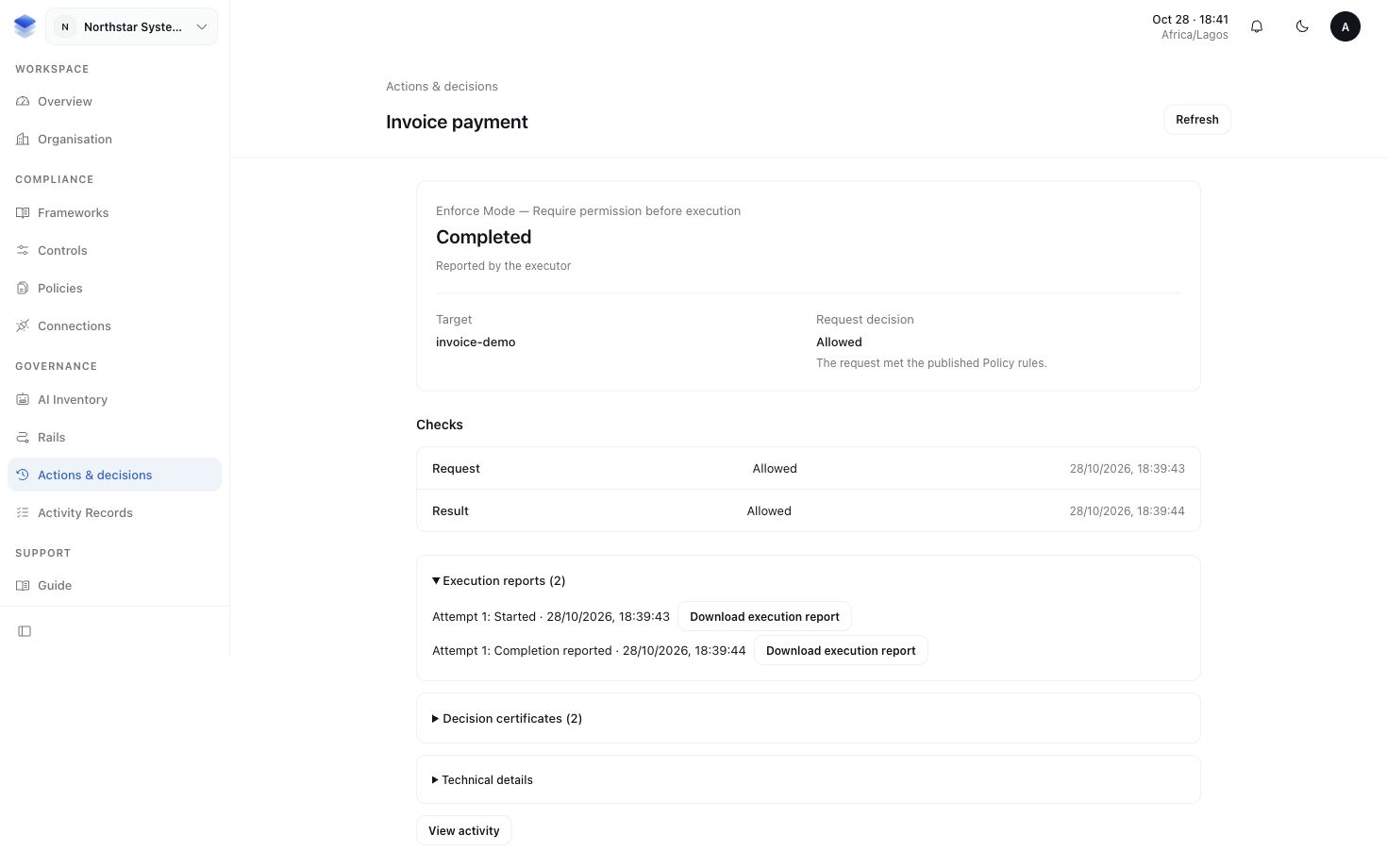
You should now be able to show both what the rules decided and what the protected application did. Human approvals explains the waiting path for requests that need review.
More about Enforce permission and failure behaviour
SDK guides call the protected business function a callback. A retained decision or report means AuthRail saved it and acknowledged it. A report saved only in the local sidecar queue is still waiting for that acknowledgement.
Enforce requires a fresh allowed decision covering the actual input, or the matching one-use permit after a required approval. It retains the execution start before the business function and checks a successful result before returning it to the agent.
| Situation | What the protected path does |
|---|---|
| Fresh allowed call retained by AuthRail | Records the execution start, then invokes the protected function. |
| Human approval needed | Waits and saves the original request context for authorised resumption. |
| Denied, uncovered, stale or mismatched decision | Stops before the function. |
| Sidecar unavailable or call report only queued locally | Stops before the function. |
| Result denied after execution | Withholds the result; the business effect may already exist. |
| Execution or completion reporting leaves an uncertain outcome | Preserves recovery information for investigation before retry. |
A denied result cannot undo a completed provider operation. If the outcome is uncertain, follow execution recovery rather than repeating the action to find out what happened.
More about Observe and separate deployments
Observe remains advisory if the sidecar or recording service is unavailable. A missing decision does not prove that nothing happened, and an application exception does not prove that a provider made no change.
The application can report its observed execution outcome separately. That report does not turn an advisory decision into enforcement.
You can use separately named deployments to compare modes. Each keeps its own identity and rule selection. There is no required Test/Live naming scheme or third Runtime mode. If protection becomes unavailable, repair it deliberately rather than silently falling back to Observe.