
How Runtime works
See what your agent tries to do and apply your rules before its tools run.
An AI assistant becomes more consequential when it can use tools: reading a customer record, sending a message, changing an account or initiating a payment. Your organisation needs to understand those requests and decide whether they are appropriate for the user, the record and the circumstances involved.
AuthRail Runtime provides that oversight within a connected application. Before a tool performs an operation, Runtime evaluates the request against the organisation's published Rails, using the application's verified identity and any business information the rule needs. The decision can allow the request, stop it or send it to a named reviewer. Runtime also checks the tool's result before it returns to the agent and keeps the decisions, approval and reported execution together so your team can investigate what happened.
The application integrates these checks with the function that performs the operation. It retains its business logic and provider credentials, while the SDK applies the decision at that point. This placement matters: a denied payment must stop before the payment function runs, whereas a result check controls what the agent receives after the function has returned.
Follow a simple example
Imagine an assistant that pays invoices. Your team allows payments up to 100 units, asks a person to review larger payments, and only permits the selected invoice to be changed.
| The agent asks to… | Your rule says… |
|---|---|
| Pay 80 units on the selected invoice | Allow the request. |
| Pay 150 units on the selected invoice | Ask a reviewer. |
| Pay a different invoice | Deny the request. |
You configure these action rules as Rails. Runtime checks the actual request against the Rails selected for that application.
What happens when a tool is called?
- The agent proposes an action. For example, “pay 80 units on this invoice.”
- Your application identifies the user and invoice. It uses its own trusted records, rather than accepting the agent's claim about who owns the invoice.
- The application asks AuthRail to check the call. In Enforce, a denied request stops here. A request needing approval waits for a reviewer.
- Your application runs an allowed tool. It keeps the payment credential and reports the attempt and its outcome.
- The tool's result is checked before it reaches the agent. A result that breaks a rule can be withheld. This cannot undo a payment that already ran.
Start in Observe to see the decisions while testing your rules. Choose Enforce only after reviewing the application path that will apply them.
Where does it run?
You connect your application with an SDK, a library added to your code, and a sidecar, a small service running beside it.
| Part | What it does |
|---|---|
| AuthRail workspace | Your team reviews AI systems, publishes Rails, handles approvals and inspects records. |
| Sidecar | Loads the deployment's Rails, checks requests locally and sends reports to AuthRail. |
| Your application and SDK | Ask for the checks, apply the decision and run the actual business function. |
The SDK and sidecar are separate because connecting a language's tools and evaluating business rules are different responsibilities. The Node adapter understands JavaScript tool calls; Go and Python adapters work with their applications' functions. All three send checks to the same sidecar implementation, which loads the selected Rails, evaluates them locally and manages report delivery.
Keeping that evaluator in the sidecar means each SDK does not need its own copy of the rule engine. A rule can therefore keep the same meaning across languages, and fixes to evaluation or reporting can be maintained in one place. The trade-off is an additional service to run beside the application. The installation guides explain how to operate that service, while the SDK guides cover the code added to your application.
The application keeps provider credentials away from the agent. The SDK must check the function that really performs the work. If the agent can call the same provider through another route, that route also needs protection.
How the sidecar stores and updates rules
The sidecar stores the deployment's signed configuration in both a local file and memory. It saves the configuration to its state file and uses the in-memory copy to check requests. After a restart, it reads the saved file and verifies the configuration before using it. In Docker, that file belongs in the persistent state volume, so recreating a container does not erase it.
To change the rules for an installation, publish the new Rail version, then select and apply it to that deployment. Publishing alone does not replace the version every deployment uses. The sidecar checks AuthRail for configuration updates every five seconds by default. It verifies an update's signature, deployment identity, validity and sequence before saving it and replacing the copy used in memory. An invalid update does not replace the accepted rules.
The signed configuration has a validity deadline; this does not delete the Rail in your workspace. A saved configuration cannot authorize new Enforce operations indefinitely after it expires. See monitoring for checking configuration validity and connection problems.
See the decision and the reported result
Open an Action in AuthRail to inspect the request check, result check and execution reports together.
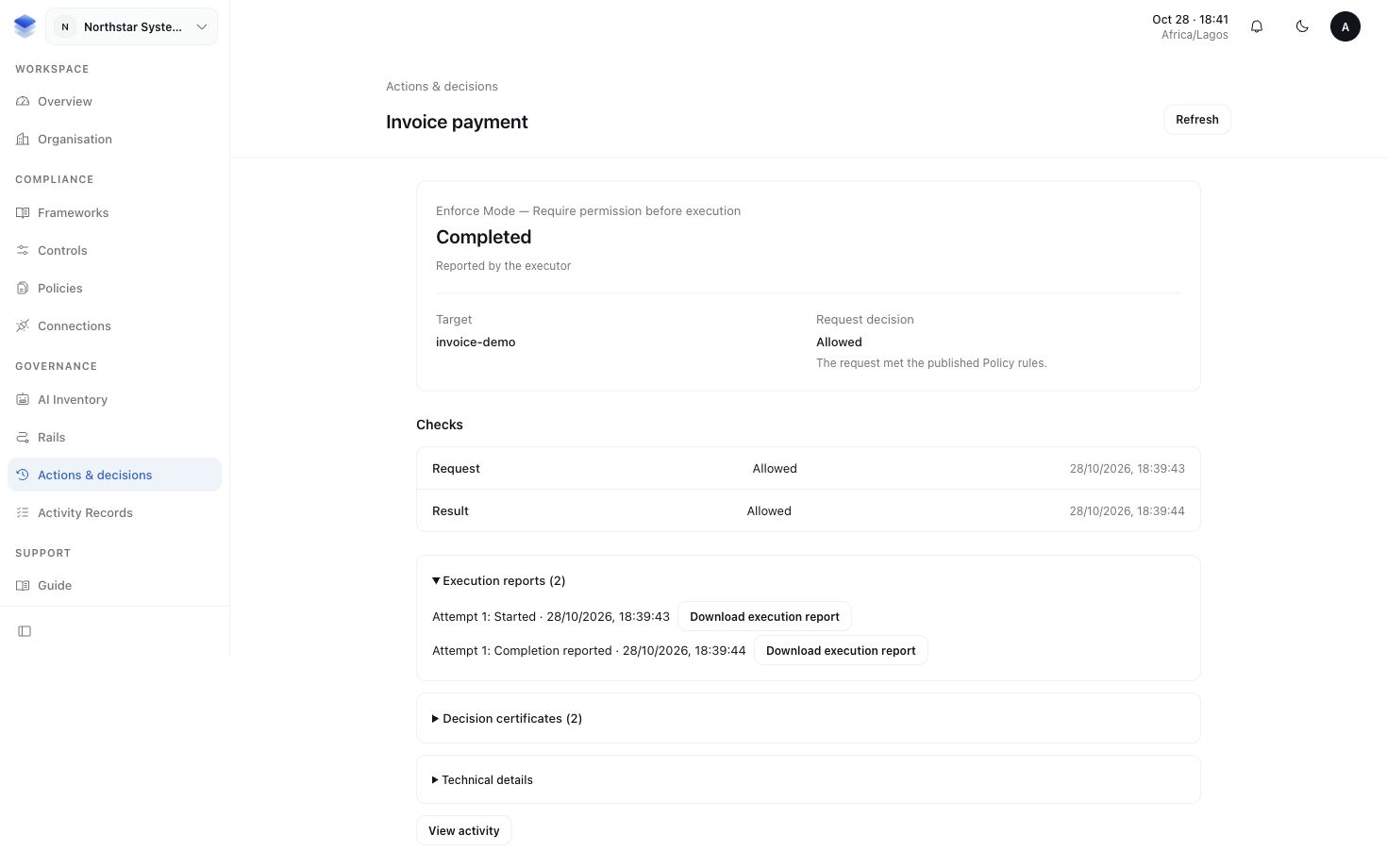
Allowed is a permission decision. Completion reported means the application said it completed the operation. To verify a provider effect, inspect the matching record in that provider. These records answer different questions.
The Runtime walkthrough follows this example through the application, sidecar logs and AuthRail screens.
How Runtime knows which application and action to check
An AI Inventory item identifies the AI system your team reviews. A deployment identifies one installation of that system, with its own mode, selected Rails and application identity.
Each connected action has a reviewed Operation Version describing its inputs, results and identity requirements. The SDK uses that version so a function name alone cannot substitute for the reviewed action.
Your team confirms the AI system and the application authenticates its requests. A configured provider or model name describes setup; it does not prove which model generated a request. See identity and deployment.
Connect Runtime to your governance work
Policies and Controls describe what your organisation expects and how it puts those expectations into practice. Runtime can apply those expectations to connected actions. A Control's Test or Evidence review determines which Runtime records support its proof.
Continue with Rails to understand the rules, or connect your first application when you are ready to set up the integration.