
Human approvals
Review a waiting request and let the originating application continue it safely.
A human approval lets a named person review a request that should not proceed automatically. For example, a payment rule may send an amount above the automatic limit to a reviewer. In Enforce, the protected function waits while the reviewer decides.
Use this flow when the request needs a person's judgement. Approving it gives permission for that request; it does not make the payment or prove that it ran.
Review one waiting request
1. Open the request assigned to you
In AuthRail, open Runtime → Approvals using an account named by the approval rule. Choose the waiting request. If you are not an eligible reviewer, ask the person responsible for that action's approval setup to check the reviewer list.
2. Check what you are being asked to allow
Read the Action, its reason, requested values and expiry. For a payment, check the amount, account and purpose. The application supplies this review context for the request being checked; do not substitute a different request discussed in chat.
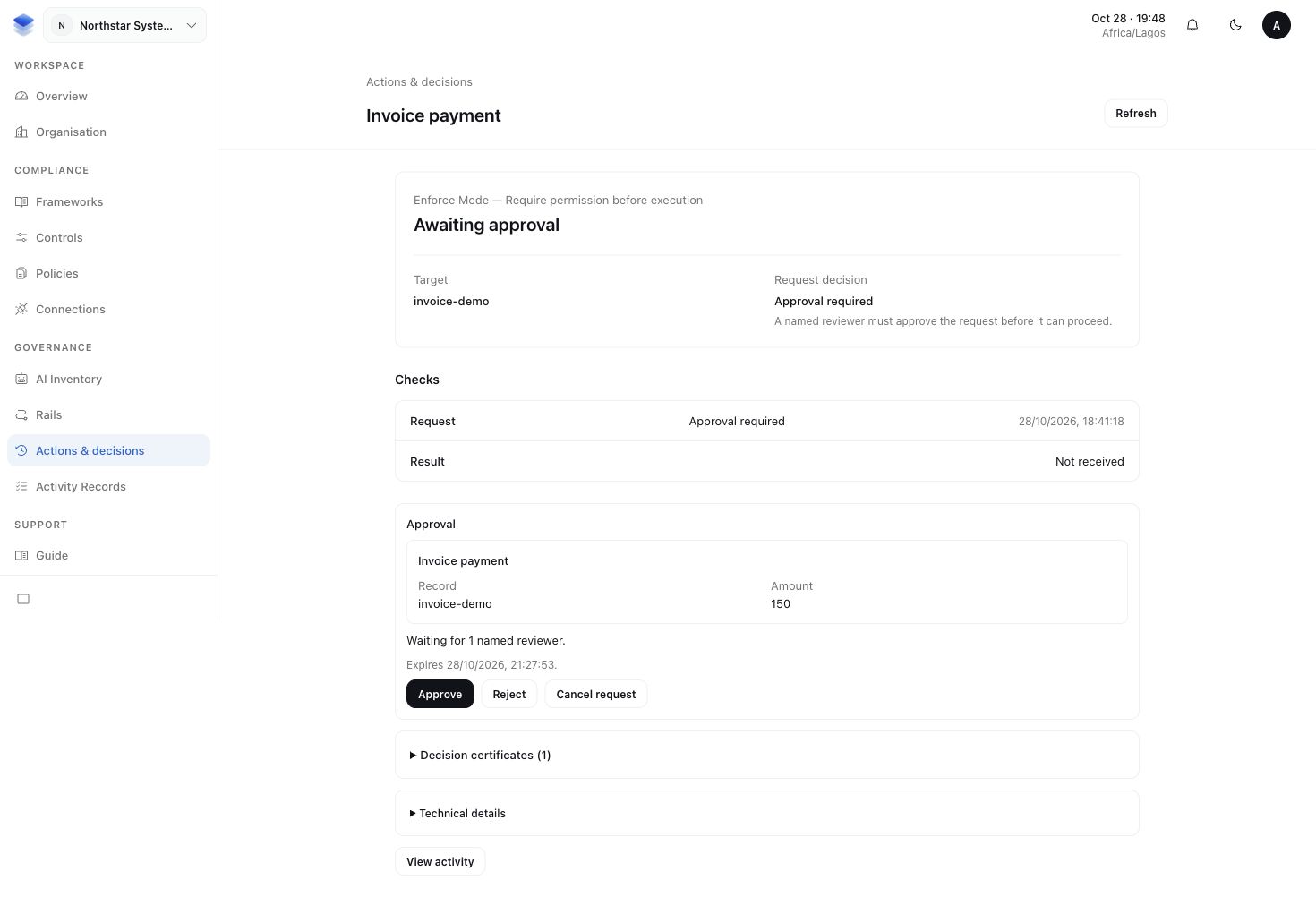
3. Approve or reject the request
Approve only the request you intend to allow, or reject it using the available review action. If the rule requires several approvals, your vote alone may not complete the review. The configured number of approvals is called the quorum.
4. Return to the originating application
After the required approval, continue the waiting workflow in the application that made the request. It resumes the same input through its protected function. In the sample application, an approved waiting request offers Continue request.
Inspect the linked Action afterward for its execution reports and result check. The expected result is a reviewed request with a recorded decision and, if the application continued successfully, a separate report of its execution. A rejected or expired request must not run through that approval.
How long can a request wait?
Read the Expires time on the approval request. That is the deadline for that request, rather than a fixed number of minutes after submission. The request cannot outlast the signed deployment configuration used to check it. If the decision uses a fact that becomes stale sooner, that earlier time sets the deadline. This does not mean the Rail itself is deleted or unpublished.
For example, suppose a rule relies on a balance read at 10:00 that is valid for five minutes. Its approval cannot remain usable after 10:05, even if the reviewer has not responded. A request without that short-lived fact may have a longer window. The deadline shown in AuthRail tells the reviewer which applies.
There is no separate setting for an arbitrary review period such as 48 hours. The displayed deadline follows the configuration and facts used for that check. If it has expired, the application must obtain a fresh decision; the old approval cannot be extended by retrying it.
Save and resume the application's work
A payment can wait for review without leaving the original HTTP request open or keeping the agent process running. The application saves the waiting work and returns an “Awaiting approval” response. Approval in AuthRail does not automatically restart the application or make the payment.
For a workflow that must survive a restart:
- When the SDK returns an approval-required block, save its approval continuation in private persistent storage. This contains the original checked call and decision needed to resume it.
- Alongside it, save your application's task ID, authenticated user and any conversation or workflow state needed afterward. The continuation is not a backup of the entire agent session. Protect it from access or changes by the agent and other users.
- Arrange a worker or a “Continue request” action to check the review outcome. After approval, load the original saved continuation and pass it to the SDK with the same protected business function.
- The SDK claims permission for that exact request, records the start, invokes the function and checks its result. Your application then updates its task and continues the conversation or workflow.
Save the checked call, then resume it
These snippets continue the Node, Go or
Python setup using an Enforce client. operation is your reviewed
Operation with authenticated identity, a stable business Action key and a safe
review summary. payment is the original application-validated input.
payInvoice / pay_invoice is your protected business function.
tasks is your application's storage, not an SDK API. Its save/load helpers
must encrypt the continuation in persistent private storage and check binding
against the original organisation, authenticated user, deployment and task ID.
A resume worker must claim that task exclusively before loading it. Never accept
a continuation or replacement arguments from the browser or agent.
The submit and resume blocks are separate invocations: after saving a wait, return from the submit handler. Run the resume block only after the required review; keep the original client identity and protected callback.
import { EnforceBlockedError } from '@authrail/sdk-node';

async function submitPayment() {
  try {
    await client.enforce(operation, payment, payInvoice);
  } catch (error) {
    if (!(error instanceof EnforceBlockedError) ||
        error.phase !== 'tool_call' || error.effectMayHaveOccurred ||
        !error.approvalContinuation) throw error;
    await tasks.saveEncrypted(binding, JSON.stringify(error.approvalContinuation));
    // Return "Awaiting approval" to the caller; do not hold the HTTP request open.
  }

}

async function resumePayment() {
  // Claim the saved task exclusively before calling this function.
  const saved = await tasks.loadEncrypted(binding);
  await client.resumeApprovalFrom(JSON.parse(saved), payInvoice);
}
The SDK still checks the saved request and claims permission before execution. A not-yet-approved, rejected, expired or replayed request must remain stopped. If resume fails, keep the saved task for inspection; do not mark it completed or start another payment. The result check can withhold a response after an effect. Use execution recovery when an effect may have happened.
How reviewers are notified
AuthRail creates an in-app notice for the active named reviewers when a request is ready for approval. Runtime notification preferences control delivery. Email is opt-in and requires a verified address; enable Runtime email in your notification settings if you want these messages. A queued email is not proof that it arrived, and a notification is not approval.
The notice opens Runtime → Approvals. Select the correct organisation, then inspect the waiting request. Notifications keep request values out of email; the authenticated review screen contains the details needed to decide.
Approval expiry and the execution permit are different deadlines
The signed deployment configuration has a validity period of 24 hours from activation. Approval uses its remaining validity, not a new 24-hour window from submission. Trusted facts can shorten that deadline further. Publishing or selecting another configuration does not extend an existing request, and the application must still pass the checks required to resume it.
After review, the SDK claims a one-use execution permit. It lasts up to 30 seconds from the claim, and can be shorter when the request or signed proof expires sooner. The application must retain its execution-start report while that permission is valid. This short permit window does not limit a reviewer to 30 seconds and is not a promise that the business operation finishes in 30 seconds.
More about setting up reviewers and review context
A Runtime manager opens Rails → Connected actions, chooses the action, then opens View action details → Approval reviewers. Select authorised organisation members and the required number of approvals.
The developer supplies a signed reviewSummary with a short title and the
facts needed to decide. A request without the required valid summary cannot
enter the approval flow. Keep credentials, raw prompts and full provider
responses out of it.
Approval requires valid organisation membership and an unexpired request. A named authorised reviewer may approve their own request where permitted; that is not independent review. Where separation of duties is needed, configure and operate the reviewer policy accordingly.
More about how an application resumes approval
After approval, the adapter obtains a short-lived one-use permit for the same Action and input. It records the execution start before invoking the business function and checks the result before releasing it to the agent.
Changing the amount, account or message requires a new checked request. An approval cannot authorise replacement input from the model. Expired and cancelled requests remain historical; resuming must not revive them.
If the workflow waits across requests or restarts, save the SDK's approval continuation, the context needed to resume, in private persistent application storage. Tie it to the original organisation, user, deployment and business task. Restore it from that storage, not from agent-supplied replacement context.
| SDK | Same-process continuation | Saved continuation | Lost permit response |
|---|---|---|---|
| Node | resumeApproval | resumeApprovalFrom | recoverApprovalFrom |
| Go | ResumeApproval | ResumeApprovalFrom | RecoverApprovalFrom |
| Python | resume_approval | resume_approval_from | recover_approval_from |
Restore the original business function and arguments. The SDK does not save the continuation for you. See the Node, Go and Python guides for the application integration.
More about a lost response or a blocked result
A lost permit response differs from a failed business operation. Recovery can read an existing valid permit for an attempt that has not started; it cannot issue another permit or authorise an attempt already started.
If permission cannot be established, keep the function stopped and inspect the Action. If the business effect may have happened, follow execution recovery rather than claiming permission again.
A result check may still require approval because it sees the same business arguments. The SDK releases that saved result only with the original Action's claimed permit. A denied, missing or mismatched result stays withheld even if the operation completed.